A Modern Papaly Alternative for Organized Work Links
Compare Papaly and TabRover for visual bookmarks, project structure, quick capture, search, sharing, and Chrome new-tab access.
Updated
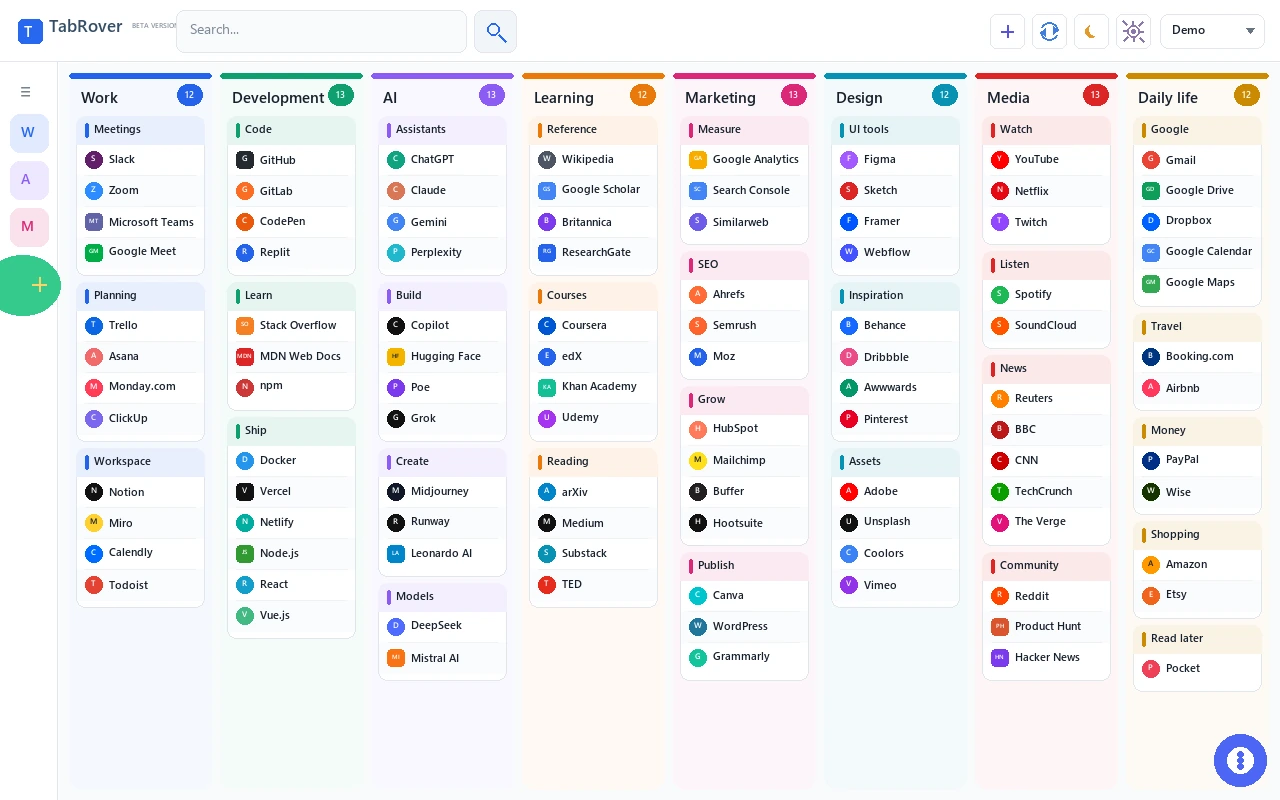
Papaly and TabRover both make bookmarks visual. The difference is what happens after you save dozens of working links: TabRover adds columns, groups, Inbox capture, and search within the current board.
Quick verdict
Choose Papaly when public or private boards, co-ownership, social discovery, themes, and sharing a board by URL are central to your workflow. Papaly remains a capable visual bookmarking service with boards and categories, browser import, HTML export, drag and drop, and a Chrome extension that can save all open tabs into a category.
Choose TabRover when your main need is a permanent map of work links on each new Chrome tab. Its structure goes from board to column to group to link, with Inbox for unsorted captures and search within the current board. A fresh install starts with one board; an active TabRover license unlocks additional boards.
| Need | TabRover | Papaly |
|---|---|---|
| Top-level organization | One board by default; additional boards with an active license | Boards |
| Structure inside a board | Columns, groups, and links | Categories and bookmarks |
| Quick unsorted capture | Dedicated Inbox | Save a bookmark into a chosen board or category |
| New-tab access | Chrome extension replaces the new tab | Chrome extension can use Papaly as the new tab |
| Search | Search the current board across titles, URLs, descriptions, and group names | Bookmark and search tools are part of Papaly |
| Public sharing | Not a published core feature | Public boards and shareable board URLs |
| Collaboration | No published co-owner workflow | Co-owners can edit public or private boards |
| Import and export | Imports Chrome bookmarks | Browser or HTML import and HTML export |
| Save open tabs together | Not a session-saving feature | Chrome extension can save open tabs to a category |
| Appearance | Automatic light or dark appearance; manual theme controls with an active license | Themes, backgrounds, and appearance settings |
Where Papaly is strong
Papaly treats a board as a collection that can be private or public. Its official help documentation says private boards can be accessed by the creator, co-owners, and people who receive a private link. Public boards can be opened through a URL and shown on a profile. Co-owners can add, modify, and delete links.
Papaly also supports bookmark import from a browser or an HTML file, export to an HTML file, batch moving and deleting, and drag-and-drop organization. Its Chrome extension can save the current page and can place all open tabs into a new category. These features make Papaly useful for shared resource lists, published collections, and users who want a path back to a standard bookmark file.
Where TabRover takes a different approach
TabRover is designed around recurring work context. A board can represent a client or project. Columns divide that work into areas such as Planning, Production, Reporting, and Reference. Groups keep related destinations together within each area. This extra visible level can help when one board contains many tools.
Inbox supports a different capture habit. You do not need to decide the final location while you are reading or working. Send the current page to Inbox, then organize it later. Search covers titles, URLs, descriptions, and group names within the current board when you remember the content but not its position.
Board structure is the main workflow difference
Papaly organizes bookmarks into categories on boards. That direct model is easy to understand and works well when categories provide enough context. Its sharing and profile features can turn a board into a resource other people can browse. If the collection is meant for a team, audience, or community, those capabilities may matter more than another level of personal organization.
TabRover places columns and groups between the board and the individual link. A column can represent a workflow stage or area of responsibility, while groups separate resources inside it. For example, a Delivery column could hold groups for Documents, Meetings, and Reporting. This structure is useful when links belong to one project but serve different moments in the work.
The right choice depends on what you need to recognize first. If you think “open the public research board,” Papaly's board-sharing model is a natural fit. If you think “open this client, then scan the reporting group,” TabRover's project map is more direct.
Capture now or classify now?
Papaly's extension asks you to save into its organization, and its all-tabs action can create a category from the open window. That can be efficient when the session itself already forms a meaningful group. It also gives you a concrete place for the set immediately.
TabRover's Inbox is for a different moment: one page is useful, but choosing its final destination would interrupt the current task. Capture it first, continue working, and sort it later. Inbox is not meant to replace a permanent group. It separates the fast act of saving from the slower act of organizing.
Choose Papaly if
- You want to publish boards or share them through public and private links.
- You need co-owners who can edit the same board.
- You value Papaly profiles and discovering public collections.
- You want direct HTML bookmark import and export.
- You often save every open tab into a category.
- You prefer Papaly themes and background customization.
Choose TabRover if
- You want work links visible automatically on every new Chrome tab.
- You need visible structure through a board, columns, and groups, with additional boards available under an active license.
- You prefer to capture pages into Inbox before deciding where they belong.
- You want to search the current board across link titles, URLs, descriptions, and group names.
- Your saved links represent stable project resources rather than temporary sessions.
- You want a focused workspace instead of public-board and social-discovery features.
A note about the Papaly Chrome extension
The official Chrome Web Store listing showed version 1.0.1.5 and an update date of June 21, 2016 when this comparison was reviewed on July 21, 2026. That is a dated store fact, not a claim that Papaly itself is unavailable or unusable. Papaly.com and its help pages were accessible during the same review. Evaluate the live service, required permissions, compatibility, and support response for your own environment before choosing.
Migration prerequisites
TabRover does not publish a one-click Papaly migration tool. Papaly can export bookmarks as an HTML file. A practical route is to export from Papaly, keep that file as a backup, import it into Chrome bookmarks, and then use TabRover to import the Chrome bookmarks. Review the result before removing anything from Papaly. Board privacy, co-owner access, themes, and social data do not become TabRover features through this process.
Before moving, list the Papaly features the collection depends on. Mark boards that are public, shared through a private link, or edited by co-owners. Record which categories came from saved tab sets. Those elements require a decision because TabRover does not reproduce them. Then test one non-critical board through the HTML-to-Chrome route and verify link titles and URLs before importing more.
After import, create a small TabRover structure rather than copying every category mechanically. Choose the board's purpose, add a few columns, and place related links into groups. Keep the Papaly export unchanged until the new layout has been used successfully. A migration is complete only when the new workflow supports the tasks you actually perform.
TabRover limitations
TabRover does not currently advertise public boards, private share links, co-owners, social profiles, or a public discovery system. It does not promise direct Papaly import or complete session saving. If those are requirements, Papaly may remain the better match. TabRover is narrower: it focuses on a personal visual workspace for recurring links, Inbox capture, search, and new-tab access.
Related comparisons and guides
See the complete visual bookmark manager guide, compare TabRover with Start.me or TabRover with Toby, and read how to organize browser bookmarks. For TabRover data handling, review the privacy policy.
Frequently asked questions
Is TabRover the same kind of bookmark manager as Papaly?
Can I migrate directly from Papaly to TabRover?
Does TabRover have public boards or co-owners?
Can Papaly save all open tabs?
Why mention the Papaly extension update date?
Official sources
Build a workspace for recurring links
Install TabRover and organize Chrome bookmarks into a board, columns, and groups that appear on every new tab. Active licenses unlock additional boards.