A Toby Alternative for Links You Use Every Day
Compare TabRover's permanent project map with Toby's tab-session, collection, Space, collaboration, and AI workflows.
Updated
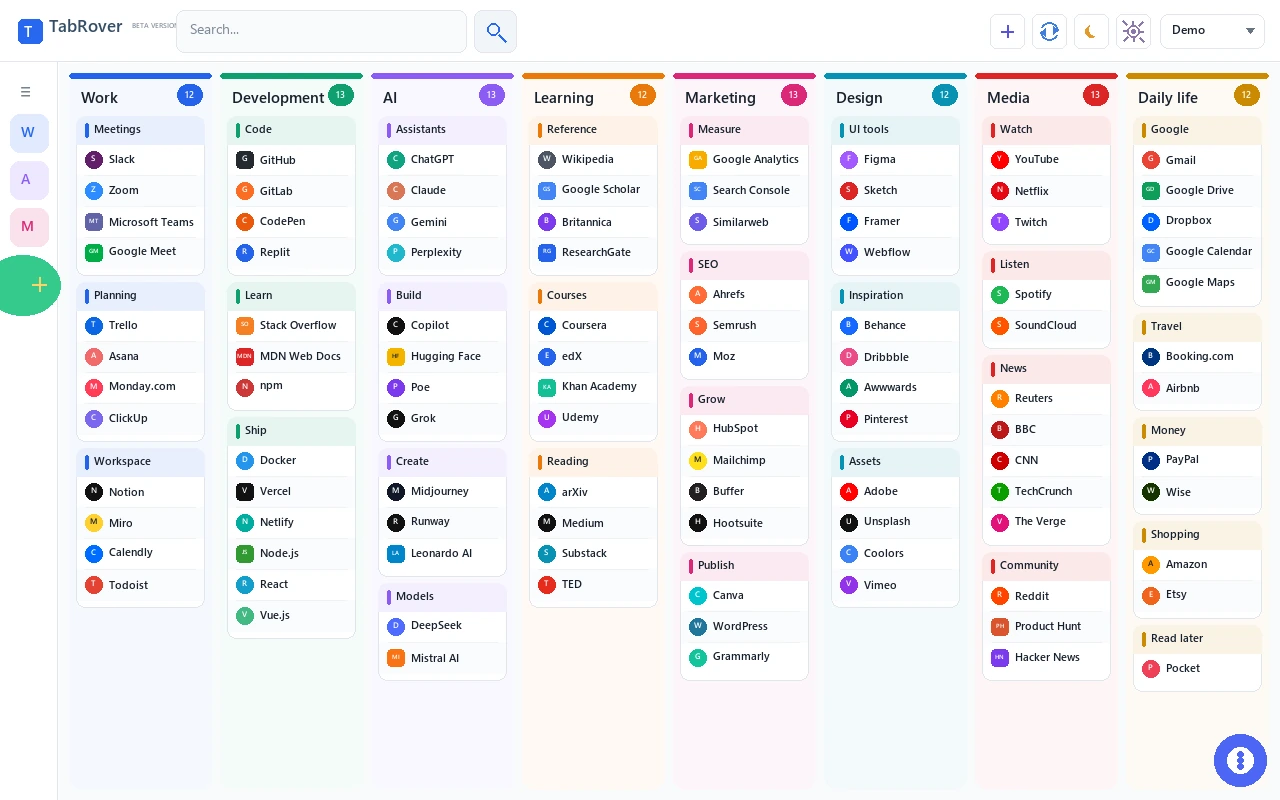
Toby is built to save and restore tab sessions. TabRover is built for the permanent resources you want to see every time a new tab opens.
Quick verdict
Choose Toby when the problem begins with too many open tabs. Its current Chrome Web Store description emphasizes saving a browser session, restoring it later, syncing collections across devices, organizing tabs into Collections and Spaces, and searching saved tabs. Toby also documents notes, shortcuts, collaboration, and AI-assisted naming and sorting.
Choose TabRover when the resources are more permanent than the session. It gives one project a stable board, divides the board into columns and groups, captures new pages into Inbox, and keeps the result visible on each new Chrome tab. An active TabRover license unlocks additional boards for more projects.
| Need | TabRover | Toby |
|---|---|---|
| Primary object | Recurring saved link | Browser tab or saved session |
| Organization | One board by default, with columns, groups, and links; additional boards with an active license | Organizations, Spaces, Collections, tabs, and notes |
| Save an entire window | Not supported as a core workflow | Session save and restore |
| Quick single-page capture | Send current page to Inbox | Save tabs into collections from the extension |
| Search | Current-board titles, URLs, descriptions, and group names | Saved-tab search, with advanced search on paid plans |
| Cross-device use | Account-based server sync, with a local copy in this browser | Cloud sync across supported devices and browsers |
| Notes | Not included | Notes inside the workspace |
| Shortcuts | Open links from the visible workspace | Toby Links can provide typed shortcuts |
| AI organization | Not included | AI naming and sorting in paid workflows |
| Collaboration | Not a published core feature | Shared collections and organization membership |
Toby is designed around live browser sessions
Toby addresses the moment when important pages are already open. A session can be saved, the tabs can be closed, and the collection can be reopened later. Spaces hold Collections, and Collections can contain tabs or notes. This is useful for research sessions, recurring sets of applications, team resources, and people who hesitate to close a window because rebuilding it would take time.
The current Chrome Web Store listing also describes cloud sync, drag and drop, instant search, Toby Links, Toby Next, notes, quick toolbar access, themes, and AI organization. Toby official help says AI can suggest collection names and sort items by content type, and notes that those AI features require a paid plan.
TabRover is a permanent map
TabRover starts from a different assumption: the important destinations should not need to remain open. A project board can hold its dashboard, documents, repository, tickets, research, and communication tools. Columns and groups keep the relationship between them visible. Opening a new tab shows the map again.
Inbox supports quick capture of one useful page. Search helps retrieve a link within the current board by title, address, description, or group name. Chrome bookmark import provides a starting point for people moving from browser folders. This is not session restoration. TabRover remembers the resources you chose to keep, not the exact state of an open browser window.
Permanent resources and temporary sessions solve different problems
A session records what was open at a moment in time. That can include an unfinished search, a set of documents needed for a meeting, or every page used during a research pass. Saving the set preserves context that would be tedious to reconstruct. Toby is built around that changing collection of tabs.
A permanent map records destinations that remain useful across many sessions. The project brief, repository, analytics dashboard, ticket queue, and team chat may be opened in different combinations each day, but their relationship stays stable. TabRover keeps that map visible without requiring the links to remain open.
These workflows can coexist. A permanent board can provide the starting resources, while a session tool preserves a temporary investigation. Replacing Toby makes sense only when the saved sessions are mostly acting as reminders for stable links. Replacing TabRover with a session tool makes sense only when restoring exact windows matters more than maintaining a visible project structure.
Search begins from a different context
Toby searches saved tabs and documents advanced search on paid plans. That is useful when the object you remember is a tab inside a larger saved collection. Its collection and Space hierarchy follows the way sessions were organized.
TabRover searches the current board across link titles, URLs, descriptions, and group names. The board is chosen first, so results stay inside the current project or area. This is a narrower search model. It does not replace a search across every saved session, but it can reduce noise when the project context is already known.
Starter limits and paid plans
Pricing and plan limits can change. On July 21, 2026, Toby official help described the Starter plan as free with up to 60 saved tabs, unlimited members, Collections, Spaces, and basic session management. The help center states that users above the limit can continue to access existing saved tabs but cannot add more until the total is below 60.
Toby official plan documentation says paid Productivity workflows add unlimited tabs, advanced search, and duplicate removal. A pricing FAQ available during this review listed Productivity at $6 per member per month, or $4.50 per member per month when billed yearly. It listed Team at $10 per member per month, or $8 when billed yearly, with SSO, priority support, and centralized billing. Verify the current checkout price and billing basis before purchasing.
This comparison does not publish a TabRover price because a current public pricing table was not verified. The choice should therefore be based on workflow first, followed by the live terms shown by each product.
Choose Toby if
- You need to save and restore whole windows or browsing sessions.
- Your workspace begins with tabs that are already open.
- You want Collections inside Spaces and need shared resources.
- You need notes, typed Toby Links, or a tab-oriented task list.
- You want AI-assisted collection naming or sorting and accept a paid workflow.
- You need paid options for unlimited saved tabs, advanced search, or duplicate removal.
Choose TabRover if
- You want stable project resources visible before you open them.
- You prefer a board, columns, and groups to session-based collections, with additional boards available under an active license.
- You want an Inbox for single-page capture without saving the full window.
- You need to import existing Chrome bookmarks.
- You want a local browser copy during a temporary server or connection failure.
- You do not need session restore, collaboration, notes, AI sorting, or duplicate removal.
Test what your saved tabs are doing for you
Review a few collections before switching. Mark tabs that belong to an exact session and tabs that are recurring destinations. If reopening the group together saves meaningful setup, keep testing Toby's session workflow. If most items are stable resources opened individually, reproduce one project as a TabRover board and compare how quickly you can begin work.
Also account for notes, shortcuts, shared collections, and organization membership. A URL may transfer through an export path, but the behavior around it may not. The safest test uses a non-critical collection, an untouched export, and a week of normal work before any original data is removed.
Migration considerations
TabRover does not publish a direct Toby importer. Toby official help says saved tabs can be exported in HTML, JSON, or text formats. Preserve an export before making changes. If the HTML export can be imported into Chrome bookmarks, you may then test TabRover Chrome bookmark import with a small sample. Confirm titles, URLs, and structure before moving more data.
Spaces, Collection membership, notes, session state, collaboration permissions, shortcuts, tasks, and AI-generated organization do not have direct TabRover equivalents. Do not assume they will migrate. If reopening an exact set of tabs is the reason you use Toby, TabRover is not a complete replacement.
TabRover limitations
TabRover does not save or restore complete tab sessions. It does not advertise shared Collections, organization roles, notes, shortcut commands, AI organization, duplicate removal, or Toby-style task workflows. Its strength is also its boundary: a persistent, visible map of links used repeatedly.
Related comparisons and guides
Read the visual bookmark manager guide, compare TabRover with Papaly or TabRover with Start.me, and learn how to organize bookmarks. Review the TabRover privacy policy before installation.
Frequently asked questions
Is TabRover a tab-session manager like Toby?
What is the Toby Starter plan limit?
Does TabRover have AI organization?
Can I migrate directly from Toby to TabRover?
Which tool is better for links I open every day?
When was the Toby Chrome extension last updated?
Official sources
- Toby official website (opens in a new tab)
- Toby Chrome Web Store listing (opens in a new tab)
- Toby interface and glossary (opens in a new tab)
- Toby Starter plan (opens in a new tab)
- Toby plans FAQ (opens in a new tab)
- Toby AI tools (opens in a new tab)
- TabRover Chrome Web Store listing (opens in a new tab)
Keep permanent work links ready
Install TabRover when you need a stable project map on every new tab, not another saved browser session.