A Focused Start.me Alternative for Work Links
Compare a focused visual workspace for recurring links with Start.me's broader start-page portal and widget system.
Updated
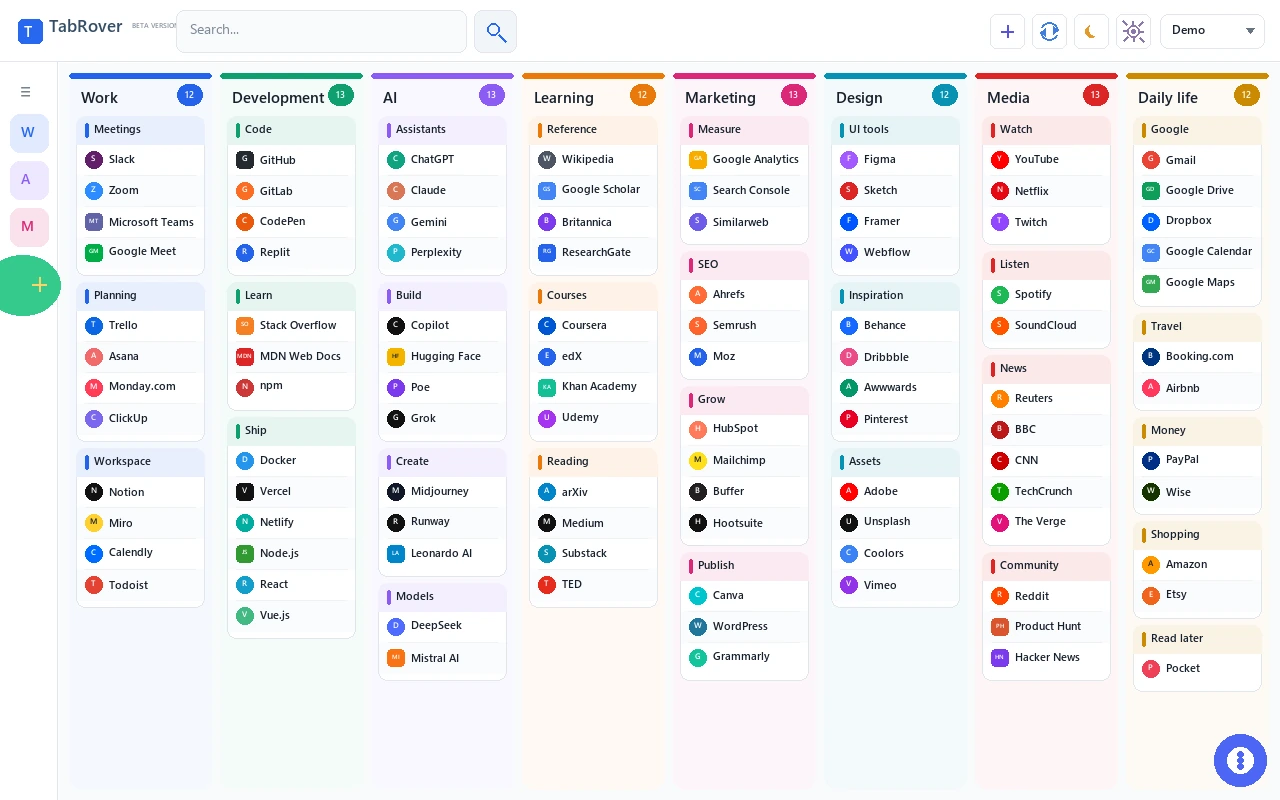
Start.me is a broad start-page portal. TabRover is narrower by design: it keeps recurring project links visible without turning the new tab into a collection of widgets.
Quick verdict
Choose Start.me when you want one portal for bookmarks, RSS feeds, notes, tasks, calendars, weather, clocks, charts, embeds, public pages, and team options. Its official documentation presents pages, columns, and widgets as the building blocks of the service.
Choose TabRover when links are the main job. It organizes them through a board, columns, groups, and an Inbox, then puts that workspace on each new Chrome tab. An active TabRover license unlocks additional boards. The product is intended to stay readable even when one project uses many recurring destinations.
| Need | TabRover | Start.me |
|---|---|---|
| Primary purpose | Visible project links | Configurable start-page portal |
| Core structure | One board by default, with columns, groups, and links; additional boards with an active license | Pages, columns, widgets, and bookmark groups |
| Quick capture | Current page can go to Inbox | Browser extension and mobile app can save links |
| Search | Current-board titles, URLs, descriptions, and group names | Page search can search the web or bookmarks |
| RSS and live information | Not included | RSS, weather, charts, calendar, and integrations |
| Notes and tasks | Not included | Notes and task widgets |
| Embedded content | Not included | Webpages, videos, documents, and custom embeds |
| Public and shared pages | Not a published core feature | Page sharing, public pages, collaboration, and team plans |
| Automatic Chrome new tab | Yes, through the TabRover extension | Browser extensions and start-page setup are available |
| Temporary connection failure | Local browser copy remains available | Official positioning centers on a cloud start page |
Start.me is a portal, not only a bookmark page
Start.me supports separate pages for work, projects, and personal use. Each page can contain columns, and those columns hold widgets. Its official feature list includes bookmarks, News and RSS, notes, tasks, calendar, weather, clocks, focus timers, charts, financial information, integrations, and embedded webpages or documents.
That range is useful when the new tab should answer several questions at once: What is on the calendar? What changed in a feed? What are today's tasks? What is the weather? Which dashboard needs attention? Start.me also offers sharing and organization plans, including team workspaces, branding, custom domains, and administrative features on relevant tiers.
TabRover keeps the job narrower
TabRover does not try to show live feeds, schedules, weather, and project links on the same screen. Its job is to make stable resources easy to see and open. A board represents a client, project, or life area. Columns and groups create visible context. Inbox captures a useful page without forcing you to organize it immediately. Search provides a second route within the current board when visual scanning is not enough.
A Work board might group Slack and Zoom under Communication, Trello and Asana under Planning, and GitHub and Docker under Development. With additional boards unlocked, a Research board might hold Wikipedia, arXiv, and Google Scholar. The visible structure helps recurring destinations stay recognizable without adding dashboard widgets.
When widgets are the right answer
A widget is valuable when the information itself should be visible before you click. An RSS feed can show new headlines, a calendar can reveal the next appointment, and a weather widget can answer a question without opening another page. Start.me is designed for this mixed-information portal model. If the new tab is expected to act as a live briefing, those features are a real advantage.
Widgets also introduce choices about layout, refresh behavior, information density, and permissions. That is not automatically a problem; it is part of building a portal. The key question is whether each live component changes a decision you make from the new tab. If it does, Start.me gives you tools TabRover intentionally does not provide.
When a link-first workspace is clearer
Many workdays start with a destination rather than a status update: open the project brief, analytics dashboard, repository, ticket queue, or meeting room. In that workflow, visible links are the interface. TabRover uses its screen space for project structure instead of showing snippets from each service.
The link-first approach can make maintenance simpler. A resource moves between groups when its role changes; it does not require a widget configuration. Inbox holds pages that have not been classified yet. Current-board search finds titles, URLs, descriptions, and group names without mixing unrelated projects into the same result set.
Free and paid plan differences
Pricing changes, so verify it before purchasing. On July 21, 2026, the official Start.me pricing page listed a Personal Free plan at $0 with a maximum of three start pages, basic widgets, and advertising. Personal PRO was listed at $25 per year with unlimited pages, 27 PRO features and widgets, no advertisements, and AI features.
The same page listed organization plans separately. These plans add capabilities such as team workspaces, user licenses, branding, custom subdomains, SAML single sign-on, and support. Those are meaningful Start.me advantages for teams. TabRover does not publish equivalent organization features in the materials used for this comparison.
This page does not make a price claim for TabRover because a current public plan comparison was not verified. Compare the live product and current terms before deciding.
Choose Start.me if
- You want bookmarks, feeds, notes, tasks, calendar, weather, and other widgets on one page.
- You need public pages, shared pages, page collaboration, or a team workspace.
- You want embedded webpages, videos, documents, or live charts.
- You need organization features such as branding, a custom subdomain, or SSO.
- You prefer a broad dashboard that can become a personal or company portal.
Choose TabRover if
- You want the new tab to remain focused on links.
- You organize work by project and need a board, columns, and groups, with additional boards available under an active license.
- You want to send pages to Inbox and sort them later.
- You need current-board search across titles, URLs, descriptions, and group names.
- You want a local browser copy during a temporary server or connection failure.
- You do not need feeds, weather, calendars, tasks, charts, or embedded widgets.
Test the decision with one working week
Before moving a large bookmark collection, write down what you actually consult from the new tab for one week. Separate destinations you open from information you read directly on the page. If feeds, tasks, weather, or calendars repeatedly answer questions without another click, build a small Start.me page and test those widgets. If most actions begin by opening stable project resources, build one TabRover board and test the link-first model.
Measure friction rather than feature count. How quickly can you capture an unexpected page? Can you find a resource when you remember only part of its name? Does the page remain easy to scan after adding a complete project? Can you maintain it without a long cleanup session? The better tool is the one whose core object matches the work: a live widget for information, or a link for a destination.
Migration considerations
TabRover does not publish a direct Start.me migration tool. Start.me lists import and export among its features. A cautious migration path is to export bookmark data, keep an untouched backup, import supported bookmark data into Chrome, and then use TabRover to import Chrome bookmarks. Test with a small set before changing the original Start.me pages.
Widgets do not become TabRover links automatically. RSS configurations, notes, tasks, calendars, charts, embeds, public-page settings, branding, and collaboration permissions would need separate handling. If those elements are central to the page, switching to TabRover would remove useful functionality rather than replace it.
TabRover limitations
TabRover is not an all-purpose dashboard. It does not provide Start.me-style RSS, notes, tasks, calendars, weather, charts, financial widgets, embeds, public portals, team workspaces, branded domains, or SSO. The focused design is a benefit only when recurring links are the main requirement.
Related comparisons and guides
Learn how a visual bookmark manager works, compare TabRover with Papaly or TabRover with Toby, and read the guide to a start page online. Review the TabRover privacy policy before installing.
Frequently asked questions
Is TabRover a complete replacement for Start.me?
Does Start.me have a free plan?
Can Start.me pages be shared?
Can I import Start.me bookmarks directly into TabRover?
Which product is better for a simple project launchpad?
Official sources
Keep your new tab focused on work links
Install TabRover and create a visual project workspace without adding feeds, weather, or dashboard widgets.